We’ve packed plenty of exciting updates into this month’s release! 🚀
Discover the latest features and optimizations in the AirLST Suite that will make your daily work even more efficient and inspiring.
NEW FEATURE
ENABLE RECOMMENDATIONS
With the new recommendation function, your attendees can suggest friends and colleagues directly during registration. No extra effort required.
How to set up recommendations:
Landing page
Open the registration form on your landing page.Enable recommendations
In the “Recommendations” tab, allow recommendations.-
Set preferences
Define how many recommendations each person can make and choose the initial status for newly recommended guests.
Practical tip with an example:
All new suggestions are automatically created with the status “Requested.” Recommended contacts immediately receive a personal email containing the event details and the name of their referrer.
Tip: Check the “Requested” status in your guest list regularly to move suitable recommendations quickly into your regular guest flow.
Start using the recommendation feature now to grow your event with valuable referrals!
NEW FEATURE
REUSABLE EMAIL TEMPLATES
What’s new?
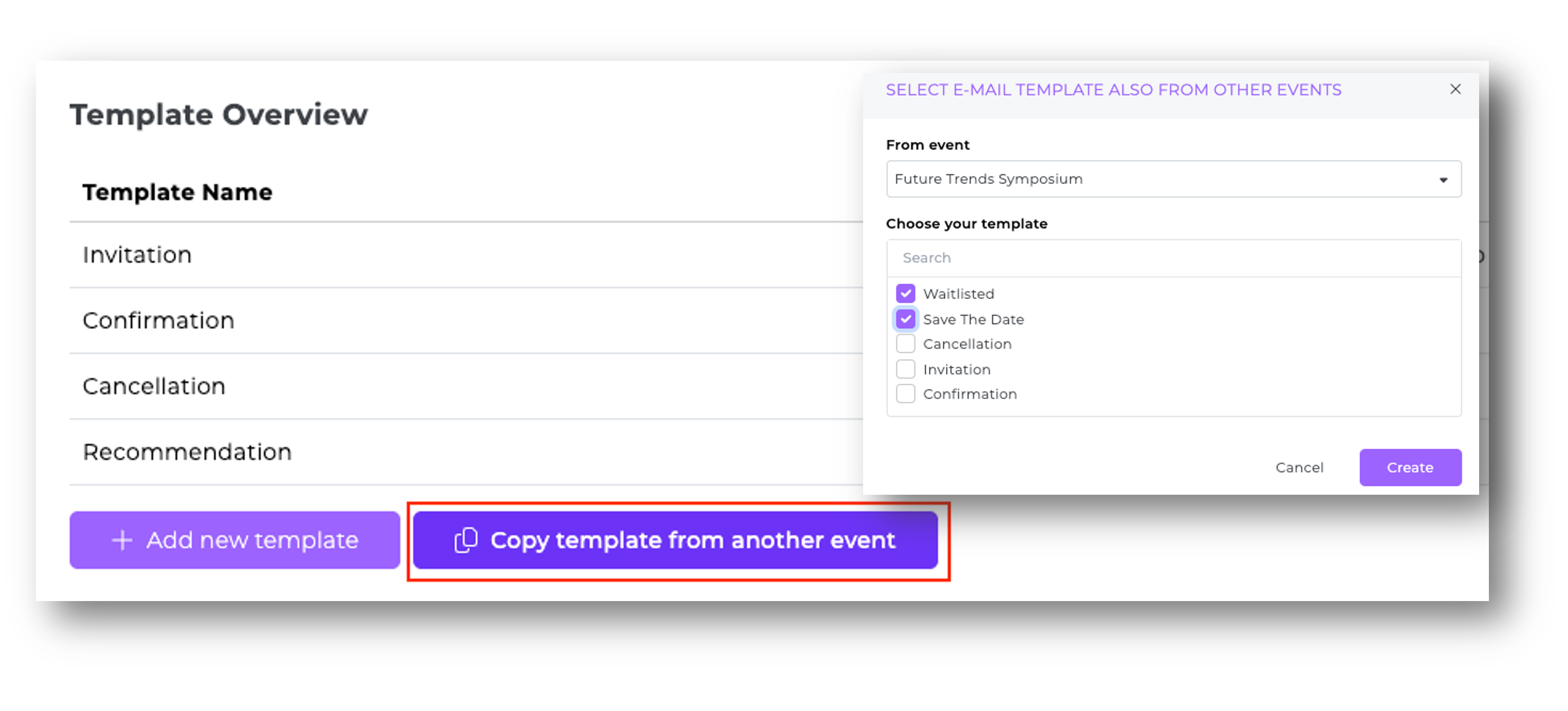
You can now reuse proven email templates from past events in any new or existing event—saving time and avoiding errors.
How to find your templates:
Create or edit an event
Go to the email-template overview of your event.Open the templates drop-down
Click the field “Apply email template from another event.”Choose a template from past events
Scroll through your list and make a selection.Confirm “Create”
Text, formatting, images and links are imported instantly.
Try the reusable templates now and take your event emails to the next level!
NEW FEATURE
SMART FIELD VISIBILITY FOR YOUR REGISTRATION FORM
The new conditional-logic engine shows each guest only the options relevant to their segment—making registration faster, clearer and easier to manage.
How to set up conditional visibility for options in a field:
Open the registration configurator
Select the registration section on your landing page.Create a drop-down field
Add a new selection (drop-down) field.Add options
Enter your option values.Save your entries
Re-open the saved field.Set a condition
Click the shield icon next to an option and define under which selection in another field this option should appear.Save
Done. Your configuration is now active.
Your benefit:
Depending on the underlying option value, only matching choices appear, so participants can register without detours.
PRODUCT UPDATE
SEATING-TOOL UPDATE
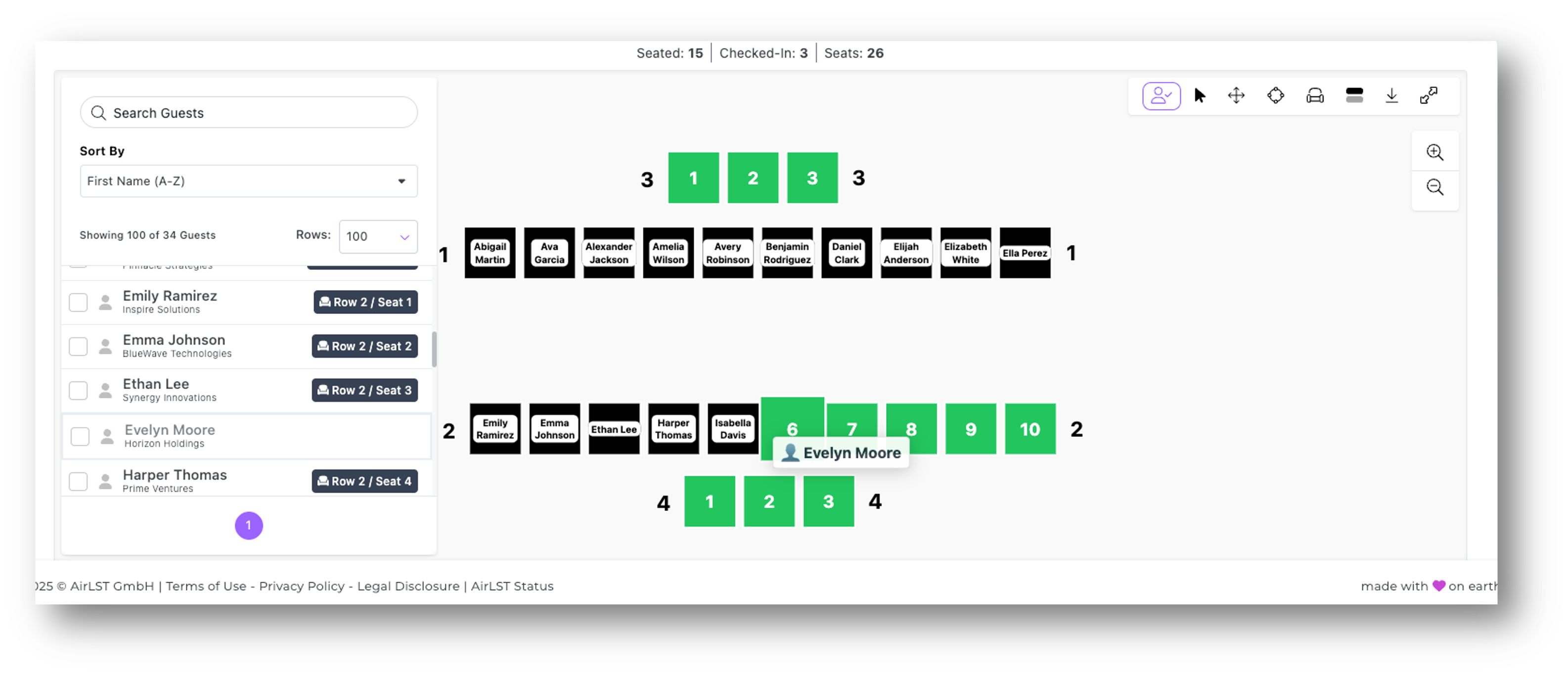
Experience even smoother and more reliable operation of our seating tool with these enhancements:
Performance boost
Guest-list and seating operations now run with even less delay.New “Save” button
You decide when changes are saved.PDF export
Download your seating plans as compact PDFs.Slimmer pop-ups
Info windows appear at the side, leaving the view unobstructed.Row labels
Numbering and labels are shown on both left and right.Drag-and-drop UX
Guests can be dragged and dropped even more intuitively.Automatic refresh
All changes take effect instantly—no manual reload needed.Improved readability
Names remain legible even in large venues.Detail updates
Tweaks to tables, rows and restoration of deleted seats.Seat-status logic
Locked or deactivated seats are no longer counted as available.
With these updates, you can design seating plans faster, more precisely and more clearly than ever before!
PRODUCT UPDATE
CHECK-IN APP UPDATE
Our Check-In App has a fresh design and now presents all familiar and new functions even more clearly.
QR generate/scan settings
Configure your app settings once on one device and share them via QR code with all other phones.API check before check-in
With the switch enabled, the check-in app continuously syncs with the guest list in the Suite. If the internet connection is weak, disable it to speed up the app noticeably.Status check
Allow check-ins only for guests with a defined status (“Select Allowed Status”).Check-in/check-out alerts
Receive pop-up warnings when required fields are missing or special entries exist during check-in or check-out.Check-in/check-out updates
During check-in, the associated field opens automatically for quick editing.Print settings
Automatic badge printing with a template you configure. Learn more here.Scan to check-out
Enable QR-code scanning exclusively for check-out to speed up the process.Enable multi-check-in
Check in multiple guests and their companions even faster.
If you have any questions, our Customer Service Team is always happy to help.